
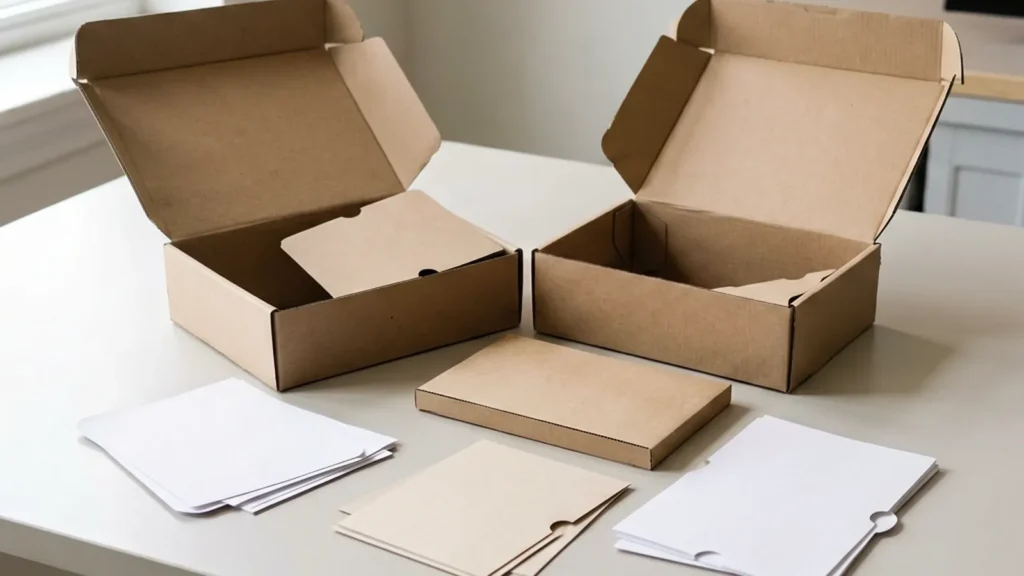
A logo mailer box fails in two quiet ways: artwork that drifts across panels, and a dieline that nobody checked against the print file before tooling.
This guide covers the print panel and dieline checks that make quotes comparable and approvals safe: spec fields, format fit, approval risks, evidence locking, and the RFQ.
- Bottom line: dieline and artwork are one revision-controlled pair.
- Logo placement is a panel decision, not a decoration afterthought.
- Approve color on a physical proof, registration on the dieline overlay.
- The RFQ should carry both files and their revision IDs.
Direct answer: Treat the dieline and artwork as one revision-controlled pair, and map the logo onto panels that survive the route, away from crush zones and fold lines. Approve color on a signed physical proof and registration on a dieline overlay before tooling. Carry the color standard, print method, and finish into the RFQ so every supplier prices the same box.
How this guide was prepared: The approval path connects the dieline revision, visible panels, logo placement, color reference, folds, registration and shipping exposure. Pantone’s print and packaging guidance supports naming the color-reference route, while the GS1 barcode implementation steps support verifying barcode data and placement in the wider artwork workflow. Exact safe areas and registration tolerances remain converter- and project-specific. Reviewed 24 August 2026.
| Brand use | Logo panel | Main risk | Approval action |
|---|---|---|---|
| Parcel-facing brand mark | Top or main outer panel | Scuff, label overlap or route damage | Review the packed box with shipping labels and handling marks |
| Unboxing message | Inside lid or interior panel | Fold direction, ink rub or hidden content | Open a production-intent sample through the actual sequence |
| Logo spanning panels | Across fold or adjoining panel | Registration and visual break at the crease | Approve a folded print proof, not the flat overlay alone |
Spec the Dieline and Print Panels First
These five fields make a logo mailer quotable. Without them, suppliers price different interpretations of the same artwork — and the difference appears only after tooling.
| Field to specify | What it controls | Risk if vague | Verification evidence to return |
|---|---|---|---|
| Dieline revision | The structural cut file version both sides quote and print against | Artwork printed against an outdated cut; panels misaligned | Overlay check tying artwork to the current dieline |
| Print panels | Which faces carry the logo and supporting graphics | Logo placed on a crush zone or fold line | Panel map reviewed on the flat sample |
| Color standard | Reference values and tolerance for the logo color | Brand color drifting between lots | Signed color proof beside the reference |
| Print method | Digital, offset, or flexo chosen for the volume and surface | Wrong method for the run size or board | Method rationale stated in the quote |
| Finish | Lamination or coating over the printed surface | Scuffed logos in transit or at unpacking | Finish sample checked for rub resistance |
Read the table as a pre-quote gate: every row answered means the quote describes the same box you approved. Rows left blank become assumptions, and assumptions are exactly what production runs on when nobody writes them down. Two suppliers quoting the same completed table give you a decision; two suppliers quoting around it give you a debate that resurfaces at sample stage, and again at reorder. The discipline costs an hour of specification work and removes a common cause of printed mailer disputes — files, panels, and structure drifting apart after the price was agreed.
Carry the dieline and artwork files with revision IDs into every request. Quotes built on named files compare; quotes built on “the latest PDF” do not.
Choose the Format That Serves the Brand
- Classic self-lock mailer the standard unboxing canvas; logo on lid and side panels.
- Inside-print mailer the reveal happens at opening; needs surface compatibility for interior print.
- Sleeve-plus-mailer a printed sleeve carries the brand while the mailer carries protection.
- Roll-end or tuck styles different panel geometry — check logo safe zones per structure.
The format changes where the logo can live and how it survives the route. Confirm the print method and finish with the structure, because the same artwork behaves differently on each combination.
Use packaging dieline and custom packaging specs for related checks.
RFQ checkpoint
Check the product route for sizes, structures, materials, finishes, and RFQ details before sampling custom mailer boxes with logo.

Control the Approval Risks
- Dieline drift structural changes after artwork approval; freeze both together.
- Color drift lots diverging from the signed proof; require lot comparison.
- Registration gaps logos crossing folds or bleed edges; verify on the overlay.
- File confusion production running an old artwork revision; enforce named revisions in the order file.
Each risk has a cheap control at approval time and an expensive one at delivery. Put the controls in the approval record so reorders inherit them automatically.
Use custom printed tissue paper products for related checks.
Lock the Evidence: Color, Registration, Finish
- Color proof a signed physical standard matched under agreed lighting.
- Dieline overlay artwork checked against the structural file before tooling.
- Finish check rub and scuff behavior on the finished sample.
- Baseline file proof, overlay result, and revision IDs stored together.
Approve artwork only when the print panel dieline matches the structural die and the color proof sits within the agreed tolerance. The factory treats the signed baseline as the production reference — hold the same file on your side. The risk is concrete: an unchecked overlay becomes misregistered panels in bulk, and a drifting color standard becomes a lot you cannot accept — both cheap to prevent at evidence stage, expensive to unwind after production.
Use custom packaging solutions for related checks.
Move the Checks Into the RFQ
- Attach the spec sheet plus dieline and artwork files with revision IDs.
- Itemize box, print setup, color count, finish, and sample charges.
- Name the evidence color proof, dieline overlay result, and finished sample required before approval.
- State the terms minimums per design, timing triggers, and the revision rule for artwork changes.
Send the request through the mailer boxes range so structure and print stay quoted as one program. Quotes answer accurately when files, dimensions, and evidence expectations arrive together — a factory quotes fastest when the specification leaves no field for it to assume.
Conclusion: Approve When Proof, Sample, and Baseline Agree
Final approval comes down to three records matching the same revision: the supplier’s proof, the physical sample, and the reorder baseline. Check the dieline overlay, the color proof, and the finish before bulk — cost and timing terms only mean something once those checks pass.
Use the checklist as your RFQ frame, and let your own proofs confirm the risk points before volume.
Logo Mailer Box FAQ
What should buyers send with the RFQ?
Internal dimensions, material family and grade, print method, finish, quantities per design, and the dieline-artwork pair with revision IDs. Ask the supplier to confirm each field in writing.
How do we keep logo color consistent?
Sign a physical color standard, state the tolerance, and require lot-to-standard checks. Screens approve ideas; physical proofs approve production.
Where should the logo sit on a mailer?
On panels that survive the route: lid top and side faces usually, away from crush zones and fold lines. Ask for a panel map with safe zones before approving artwork.
How do MOQs and costs scale with print?
Color count, print method, and finish drive setup and unit cost alongside the box itself. Request the breakdown per driver so quantity steps and future sizes quote consistently.
Use paper packaging quality control for related checks.
RFQ handoff: Send product size, finished box size, material target, dieline status, quantity, and packing method so custom mailer boxes with logo can be checked before sampling. Send Specs for Review.

Ask a Packaging Question